Choosing an Inspection Machine For Printing in 2026 requires more than comparing camera resolution or purchase prices. Modern print production demands stable color, accurate registration, clean text, and reliable defect detection at high web speeds. A suitable system should inspect labels, flexible packaging, cartons, or commercial sheets without slowing production. It must also create clear evidence for operators, quality managers, and customers.
Dr. W. Edwards Deming, a leading quality-management authority, stated, “Quality comes not from inspection, but from the improvement of the production process.” His principle remains highly relevant to printing. An inspection system should not merely reject flawed rolls. It should identify repeating marks, ink splashes, missing characters, coating gaps, and registration drift early enough to correct the press.
This guide will examine camera technology, lighting, software, resolution, line speed, data storage, and integration with existing presses. It will also consider operator training and maintenance, because expensive equipment can still fail through poor setup. Look for systems that distinguish harmless paper texture from a serious defect. Ask how quickly the machine learns a new job. Check whether reports are understandable at 2 a.m.
The selection process is rarely perfect. A wider camera may increase coverage but complicate lighting control. Higher resolution may expose tiny defects while producing more false alarms. Budget pressure can also encourage compromises that appear sensible today but become costly later. Careful testing with real substrates, real artwork, and real production speeds remains essential.
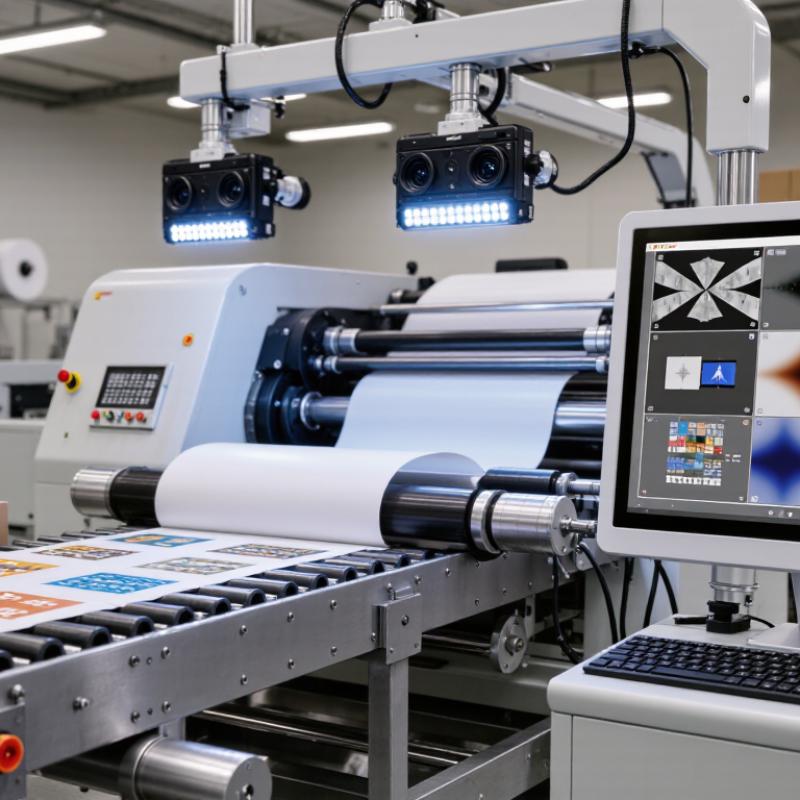
List the critical defects by product risk. These may include missing text, blurred characters, ink smears, color shifts, registration errors, pinholes, and incorrect codes. Specify the smallest defect that matters. For example, a 0.3-millimeter missing mark may be critical, while a slight background shade may be acceptable.
Record the printing speed, material width, repeat length, and expected contrast. The machine must inspect real samples, not only clean test sheets.
Set measurable acceptance rules with operators, quality staff, and production engineers. A useful system should identify the defect location, save evidence, and separate repeated faults from isolated marks. Check whether lighting remains stable across glossy, textured, or transparent materials. Camera resolution matters, but resolution alone does not guarantee reliable detection.
Some defects are difficult to classify. A faint smear may resemble a shadow. An overly sensitive setting can stop production unnecessarily. Run trials with approved defects, borderline samples, and good prints containing natural variation. Review the rejected samples manually. The target is not perfect inspection. It is consistent, explainable detection that supports practical quality decisions.
Choosing Inspection Technology for Different Print Materials in 2026
Choosing inspection equipment in 2026 starts with the printed substrate, not the camera specification sheet. Paperboard absorbs ink, so color variation and missing text require stable lighting and high-resolution line-scan cameras. Glossy film reflects light unevenly, creating false defects near seals and registration marks. Polarized illumination can reduce glare, but it may weaken contrast on some dark inks. Test it physically.
For transparent film, backlighting reveals pinholes, bubbles, and contamination more clearly than front lighting. Metallic foil needs controlled angles, because mirror-like reflections can hide scratches. A combination of diffuse and directional lighting often performs better than one bright source. Embossed labels and corrugated board need 3D or height-sensitive inspection when crushed edges matter. Standard 2D imaging may miss them.
Machine-learning classification helps separate harmless texture from critical print defects, especially across changing artwork. Still, algorithms need representative samples, including acceptable variation and difficult worst-case rolls. Ask for tests using your actual speed, ink density, web tension, and splices. Measure false rejects, missed defects, inspection width, and response time. A fast machine that stops production often is not efficient. I have seen teams overvalue pixel count and undervalue lighting stability. That choice deserves review. Keep audit images and calibration records for reliable quality decisions.
Comparative fit of common inspection technologies for different print materials. Higher scores indicate better practical suitability for detecting print defects, registration errors, color variation, and surface contamination.
Visible-light camera inspection is generally effective for paper, labels, and transparent films. UV fluorescence is useful when fluorescent inks, coatings, or contamination must be identified. Infrared inspection is more suitable for opaque or dark substrates and applications where ink density or hidden coating variation is important.
How to Choose an Inspection Machine for Printing in 2026?
Resolution, speed, and production compatibility should guide your inspection decision. A high-resolution camera may detect a 50-micron pinhole, but it can create larger files and require stronger lighting. Smithers’ 2024 printed packaging report forecasts continued growth in short-run and variable-data production. That trend increases the need for stable defect detection across frequent job changes. Test your smallest critical defect on the actual substrate, ink, and finish. Laboratory results can mislead.
Speed must match the press, rewinder, and material behavior. A machine rated for 300 meters per minute may struggle when vibration, dust, or glossy film affects image quality. PMMI’s 2024 State of the Industry research highlights labor efficiency and automation as major packaging priorities. However, automation does not remove every weakness. Poor calibration still produces false alarms. Measure inspection accuracy, alarm frequency, setup time, and data export speed during a full production trial. Check whether the system supports your web width, print repeat, splices, and inspection zones.
Tips: Request a sample test using real defects. Compare 100% inspection with manual sampling. Confirm the machine can store images without slowing the line. Ask operators to change jobs during the trial. Their feedback often reveals practical problems that specifications hide. A slightly lower resolution may be wiser if it delivers consistent results at production speed.
| Inspection Machine Category | Typical Printing Application | Typical Camera Resolution | Typical Line Speed | Smallest Detectable Defect* | Recommended Web Width | Production Compatibility | Best-Fit Rating |
|---|---|---|---|---|---|---|---|
| Entry-Level Web Inspection | Labels, narrow-web packaging, short production runs | 2–4k pixels across web | Up to 150 m/min | Approximately 0.20–0.40 mm | 100–450 mm | Suitable for intermittent or continuous presses with moderate output and manual review. | Good |
| Standard 100% Web Inspection | Flexible packaging, labels, folding cartons, commercial print | 4–8k pixels across web | 150–300 m/min | Approximately 0.10–0.25 mm | 300–1,000 mm | Compatible with most flexographic, gravure, offset, and digital web presses. | Very Good |
| High-Speed Packaging Inspection | Large-volume flexible packaging and high-speed label production | 8–12k pixels across web | 300–600 m/min | Approximately 0.08–0.15 mm | 600–1,600 mm | Requires synchronized encoder feedback, stable web transport, automatic defect marking, and low-latency processing. | Excellent |
| High-Resolution Print Verification | Security print, pharmaceutical packaging, variable-data print, premium graphics | 8–16k pixels across web | 50–250 m/min | Approximately 0.03–0.10 mm | 100–800 mm | Best for applications where fine text, barcode quality, registration, and color consistency are more important than maximum speed. | Excellent |
| Sheet-Fed Print Inspection | Folding cartons, commercial sheets, inserts, and paperboard packaging | 4–12k pixels across sheet | 3,000–18,000 sheets/hour | Approximately 0.10–0.30 mm | Maximum sheet width dependent | Must support sheet registration, front-and-back inspection, pile handling, and synchronization with the feeder. | Very Good |
| Offline Rewinder Inspection | Finished rolls, quality audits, defect removal, and customer-specific final checks | 4–12k pixels across web | 100–500 m/min | Approximately 0.08–0.25 mm | 300–1,600 mm | Suitable when several presses share one inspection station or when inspection is performed before slitting and shipment. | Very Good |
When choosing a printing inspection machine in 2026, examine the software before the camera specifications. The interface should display defects clearly, not bury operators under complicated menus. Ask for a live demonstration using your actual substrate, ink density, speed, and defect types. A reliable system should detect missing text, color shifts, streaks, and registration errors consistently. It should also store inspection images and production data securely for later review.
Integration affects daily productivity. Confirm compatibility with existing presses, workflow software, data systems, and production networks. The machine should exchange job information without repeated manual entry. Check whether alerts can reach the right operator at the right time. Poor integration creates silent delays. A practical test should include job changes, network interruptions, and rejected products moving through the line. No checklist is perfect. Unexpected conditions reveal more than a polished demonstration.
Maintenance requirements deserve equal attention. Review cleaning routines, calibration frequency, spare parts, remote support, and service response times. Operators should complete routine checks without advanced technical training. Training should include real samples, not only slides. A simple interface reduces mistakes during long shifts, but it cannot replace clear procedures. Ask how the system behaves when lighting changes or a sensor becomes dirty. Small weaknesses matter. In one evaluation, the fastest machine lost value because operators avoided its complex setup. That point is easy to miss. A short trial with several shifts can expose training gaps, maintenance habits, and uncomfortable workflow problems before installation.
The lowest purchase price rarely represents the lowest operating cost. Calculate the full cost across five years, including installation, training, maintenance, software, energy, and downtime. A machine may need expensive lighting replacements or specialist support. Those costs often appear after approval.
Start with your real production conditions. Record web width, line speed, substrate types, print defects, and shift patterns. During a factory trial, inspect a dusty roll, reflective film, and a difficult color change. Ask operators to test the interface. Small delays become expensive across three shifts.
Scalability deserves equal attention. Choose a platform that can accept additional cameras, inspection zones, data connections, and future software updates. Confirm whether upgrades require new hardware or a complete replacement. Check service response times, spare-part availability, and training quality. Request clear acceptance criteria based on defect size, detection rate, false alarms, and reporting speed.
Do not trust impressive demonstrations alone. Test your own samples.
A common mistake is overestimating future volume. An oversized system can waste capital, space, and energy. Yet selecting a closed system may limit growth when product formats change.
Compare two or three five-year scenarios, then challenge every assumption with production and maintenance staff. The best choice is not always the most advanced machine. It is the one that remains measurable, serviceable, and financially sensible as your print operation develops.