Blog

What Is the Best WiFi Carbon Monoxide Detector?

Choosing the best Wifi Carbon Monoxide Detector is not just about checking an app. It is about getting a clear alarm when CO threatens people who may be asleep. The CDC reports that unintentional carbon monoxide poisoning causes more than 400 U.S. deaths and over 100,000 emergency department visits each year. Those figures make dependable sensing and audible alerts essential.

A connected detector can send a phone notification when you are away. But Wi-Fi can fail, phones can be muted, and batteries can run low. Look for a certified CO alarm, a loud local siren, clear fault alerts, and backup power. In the United States, UL 2034 is a key safety standard for residential CO alarms. NFPA guidance recommends alarms outside sleeping areas and on every level. NFPA outreach leader Lorraine Carli is associated with this practical placement advice: “Install carbon monoxide alarms outside each sleeping area and on every level of the home.” Check the device’s label and instructions; smart features do not replace proper placement.

Still, a connected alarm is not magic. A router outage should not silence its local warning. That detail is easy to overlook. The best model for your home depends on its layout, power options, app reliability, and compatibility with existing alarms. This guide compares those trade-offs, so you can judge which Wifi Carbon Monoxide Detector offers useful connectivity without sacrificing basic protection. A little skepticism helps.
What Is the Best WiFi Carbon Monoxide Detector?

What a WiFi Carbon Monoxide Detector Is and How It Works

A WiFi carbon monoxide detector measures carbon monoxide in the air and connects to a home wireless network. Many models use an electrochemical sensor, which reacts to the gas and helps the device assess its concentration over time. When levels reach the unit’s alarm threshold, a built-in siren sounds. The sensor cannot make the gas visible or detectable by smell. Carbon monoxide has no color or odor. That is why a clear, loud local alarm matters, even in a connected home.

WiFi adds remote notifications, often through a phone app, when the detector alarms or needs attention. Imagine a detector near a bedroom: its siren can wake someone at home, while a network alert may reach a person away. But internet service can fail, and phones can be muted. A notification should never be treated as a substitute for the detector’s own alarm. Check the instructions for backup power, placement, and sensor replacement intervals; these details vary. Test the device as directed and keep its vents clear of dust. If an alarm sounds, get everyone outside and contact emergency services from a safe place. Do not re-enter until responders say it is safe. WiFi is useful, but it is not magic.

How WiFi Connectivity Supports Carbon Monoxide Alerts

What Is the Best WiFi Carbon Monoxide Detector?

WiFi connectivity can extend a carbon monoxide alarm beyond the sound of its siren. If a detector senses CO while you are away, an app notification may reach your phone and help you act sooner.

The CDC reports that unintentional CO poisoning causes more than 400 U.S. deaths, 100,000 emergency visits, and 14,000 hospitalizations each year. These figures show why timely warnings matter. A connected alarm is useful, but it cannot guarantee that a notification arrives or gets noticed.

Choose a detector with a loud local alarm and appropriate safety certification, such as UL 2034 listing in the United States. Treat WiFi as an added alert channel, not a replacement for the siren. Notifications depend on working power, internet access, app settings, and a phone you can reach.

A router outage can interrupt remote alerts. It is an easy detail to overlook.

Tips: Test the alarm as its instructions recommend, enable app notifications, and check the device’s connection after changing your router. Keep detectors near sleeping areas and on each level of your home, following the manufacturer’s placement guidance. A notification is helpful; a practiced response matters more.

Key Features to Compare When Choosing a WiFi CO Detector

A WiFi carbon monoxide detector should combine a clear local alarm with dependable app notifications. Compare how alerts arrive, whether several household members can receive them, and what happens during a router outage. A phone alert is useful, but it should never replace the detector’s audible alarm. CO has no smell.

Check the sensor’s stated service life and replacement schedule. Some models display sensor status or warn when the unit needs attention. Look for a test function you can use without guessing whether the device is working. Battery backup matters during a power cut; confirm how long it lasts and whether the alarm remains active offline. Small details count.

Connectivity deserves a real-world check. A detector in a basement or hallway may sit beyond reliable WiFi coverage, so test the signal at its planned location. Review whether the app shows alarm history, low-battery warnings, and device status. Also compare installation needs, mounting options, and recognized safety certifications for your region. I would not choose by app features alone; it is easy to overvalue a sleek dashboard and overlook a confusing test button. A practical alarm should be easy to hear from a closed bedroom door.

What Is the Best WiFi Carbon Monoxide Detector? - Key Features to Compare When Choosing a WiFi CO Detector
Feature Why It Matters What to Compare Practical Check
CO sensing technology The sensor detects carbon monoxide; sensing technology and device design affect how the alarm responds to CO. Check the sensor type, stated operating life, and the manufacturer’s replacement guidance. Electrochemical sensing is commonly used in residential CO alarms. Look for a clearly stated sensor lifespan and an end-of-life warning. Replace the alarm when required, even if it has not sounded.
Safety certification Certification indicates that a product has been tested against a recognized safety standard for its intended market. For the United States, check for certification to UL 2034. In Europe, check for conformity with EN 50291. Applicable requirements vary by location. Verify the certification on the product or its documentation, and follow local building and fire-safety requirements.
WiFi compatibility A detector needs a compatible network to connect to its app and send remote notifications. Check supported WiFi bands, router requirements, app compatibility, and whether setup requires a particular network configuration. Confirm compatibility with your home router before purchase. Remote notifications generally require an active internet connection.
Local alarm during an outage Internet or router problems can interrupt remote alerts, but occupants still need an audible warning at home. Check whether the detector continues to sound locally if WiFi or internet service is unavailable, and whether it reports connection loss. Choose a device with a local audible alarm and test it according to the instructions. Do not rely on phone notifications as the only warning.
Power source and backup Power design affects installation options and whether the alarm can operate during a power interruption. Compare battery-powered, hardwired, and plug-in models, along with backup-battery requirements and low-battery warnings. Check how often batteries need replacement and whether backup power is included or must be purchased separately.
Alert options Clear, timely alerts help people respond to a potential CO hazard, including when they are away from home. Compare the audible alarm, app push notifications, alarm-history records, and options for sharing alerts with household members. Check whether app alerts require a subscription and whether multiple phones can receive notifications.
CO level display and history A digital reading or event history can help users understand reported CO levels and review past alarm activity. Check whether the display shows current CO readings, peak levels, or only alarm status, and how long event history is retained. Read the instructions carefully: a displayed reading is not a substitute for responding to an alarm or following emergency guidance.
Alarm response and silence controls Alarm behavior and controls affect how users distinguish an emergency from a test or nuisance event. Review the alarm pattern, test procedure, silence-function limits, and instructions for responding to an alarm. Never ignore a sounding CO alarm. Follow the device instructions and local emergency guidance; do not silence an alarm without addressing the possible hazard.
Interconnection and smart-home support Interconnected alarms may alert occupants in more than one area, while smart-home features can add convenience. Check whether compatible alarms can interconnect and whether integrations depend on a hub, internet service, or specific platforms. Confirm that connected features do not replace required alarms or affect the detector’s independent local warning.
Placement and installation Correct placement is essential for an alarm to provide its intended protection. Compare mounting options and installation requirements, then follow the product instructions and local guidance for placement. Do not assume every model belongs in the same location. Follow the detector’s instructions and applicable local recommendations.
Maintenance and replacement Testing and timely replacement help keep the alarm ready to operate. Check test-button guidance, cleaning instructions, low-battery alerts, and the end-of-life signal. Test and maintain the detector as directed by its manufacturer, and replace it at the stated end of its service life.

How to Match a Detector to Your Home and Safety Needs

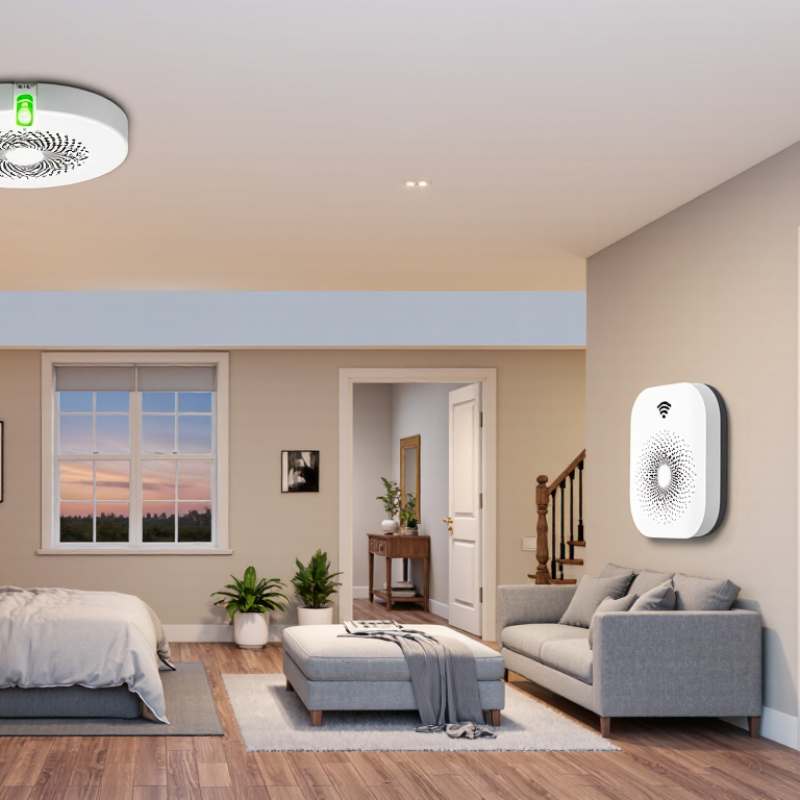
A WiFi carbon monoxide detector should fit the way your home is used, not just its list of features. In a small apartment, a clear alarm and reliable phone alerts may be enough. In a larger house, consider whether the device can connect with other alarms, so a warning reaches bedrooms upstairs. Place detectors where the manufacturer recommends, especially near sleeping areas. Follow the instructions carefully; a convenient outlet is not always the right location.

Think about your internet and household routines, too. WiFi alerts can help when you are away, but they depend on a working connection and power. A phone notification is not a substitute for a loud local alarm. That matters. Check whether the detector keeps sounding if the router loses service, and whether other household members can receive alerts. Look for clear test and replacement guidance, and check local safety requirements before choosing a setup. I might be tempted by extra app features, but they are less useful than an alarm everyone can hear and understand. A detector should also suit the people at home: consider accessible controls, readable status lights, and whether anyone needs a different alert method. Some homes have awkward layouts, and no single placement plan fits every room.

Installation, Testing, and Maintenance of WiFi CO Detectors

What Is the Best WiFi Carbon Monoxide Detector?

A WiFi carbon monoxide detector is only useful if it can sense danger and alert people reliably. Choose a model with a loud local alarm, clear status indicators, and app notifications. WiFi adds convenience, but it depends on power, network access, and phone settings. Keep it audible. Check the manual before choosing a location; placement guidance can vary by detector and room layout.

Install the detector using the supplied instructions, away from vents or spots where airflow may interfere with readings. Avoid placing it where steam or cooking fumes could trigger nuisance alerts. Test the alarm with its test button after installation, then test it regularly as directed; many safety authorities recommend monthly testing. A test confirms the alarm sounds, but it may not verify every sensor function. Replace the unit when its manual says, or when its end-of-life signal appears. If an alarm sounds, get everyone outside and contact emergency services from a safe location.

Tips: Set up app alerts, then send a test notification to confirm they arrive. Keep your phone’s notifications enabled, and tell household members what the alarm sounds like. Don’t assume a green light means the detector is working perfectly; check its status and expiration date. Small details matter. I’d also review the setup after changing the router, since reconnecting a device can be easy to overlook.